

For UK players, signing in to bwin should be straightforward: visit the official site, use the details linked to your account, and check that the connection is secure before entering personal information. This guide covers the login process, common access problems, account safety and what to know about promotions. Features and offers can change, so always check the terms shown on bwin’s official UK pages before taking action.
Getting to the official bwin login page
Start by typing bwin’s official address into your browser or using a trusted bookmark. Avoid links in unexpected emails, social media messages or adverts that promise unusually large bonuses. Fraudulent pages can imitate a casino’s branding while collecting usernames, passwords or payment details.
Before signing in, check the address bar carefully. The website should use HTTPS, and the domain should match bwin’s official UK service. A padlock icon indicates an encrypted connection, but it does not by itself prove that a site is genuine. If anything looks unusual, leave the page and reach bwin through a known, official route.
How to log in to a UK account
- Open the official bwin website or app, if available for your device and region.
- Select the sign-in option.
- Enter the username or email address and password associated with your account.
- Complete any additional security check requested on screen.
- Once signed in, review your balance and account details before making a deposit or placing a bet.
Use your own device where possible. If you must access your account on a shared computer, do not save the password, and sign out fully when finished. Close the browser window afterwards, especially if the device is used by other people.
Keeping your account secure
A strong, unique password is one of the simplest ways to reduce the risk of unauthorised access. Avoid reusing a password from email, social media or other gambling accounts. A password manager can help create and store complex passwords, provided the manager itself is protected by a secure master password and device lock.
- Do not share your password or verification codes with anyone.
- Be cautious of messages claiming that your account will be closed unless you act through a supplied link.
- Keep your phone, browser and security software up to date.
- Use a private internet connection rather than an unsecured public Wi-Fi network.
- Check account activity and contact support promptly if you notice something you do not recognise.
Never send payment details or identity documents in response to an unsolicited message. If bwin requests information as part of an account check, access your account through the official site and follow the instructions provided there. Contact customer support using contact details published on bwin’s official website, not details supplied by an unknown caller or sender.
What to do if you cannot sign in
Check the details you entered
First, make sure there are no typing errors, accidental spaces or keyboard settings affecting your password. If you use autofill, confirm that it has not entered an old password or information for another account; Repeated guesses may trigger a temporary security restriction, so avoid trying random variations.
Reset your password through the official site
If you cannot remember your password, use the password-recovery option on bwin’s official login page. Follow the instructions sent to the email address or phone number connected to your account. If the reset message does not arrive, check spam and junk folders, and make sure you entered the correct account contact details.
Do not use a password-reset link received unexpectedly unless you have confirmed it is genuine. When in doubt, go to the official website independently and request a new reset message from there.
Consider browser or connection issues
An outdated browser, saved cookies or a temporary network problem can sometimes prevent a page from loading correctly. Try refreshing the page, updating the browser or using another trusted browser. You can also clear the site’s cached data, but be aware this may sign you out of other services. Do not install unfamiliar software or browser extensions offered by a pop-up claiming to fix login problems.
Contacting bwin support
If the usual recovery steps do not work, contact bwin through the support options available on its official UK website. Explain the problem clearly and include any error message, the device and browser you are using, and when the issue began. Never include your full password or a one-time verification code in a support message.
For payment questions, describe the transaction date, amount and payment method, but share sensitive financial information only through a secure, official process. Support may need to verify that you are the account holder before discussing account-specific details.
Promotions, voucher codes and payment help
UK players may encounter bwin promotions, but eligibility, availability and requirements depend on the offer and the account. Read the full terms before opting in or depositing. Check the minimum deposit, qualifying games or markets, expiry dates, wagering requirements and any maximum conversion or withdrawal limits. A promotion is not guaranteed profit, and wagering requirements can involve substantial play.
If you are searching for cashier payment help for bwin voucher code, use the cashier and help information provided on bwin’s official UK website. Confirm that the voucher is accepted for your account and understand any restrictions before buying or entering a code. Never send a voucher number or PIN to someone who contacts you claiming they can apply it for you. If a payment or code is not recognised, keep the receipt and contact official support rather than repeatedly submitting it.
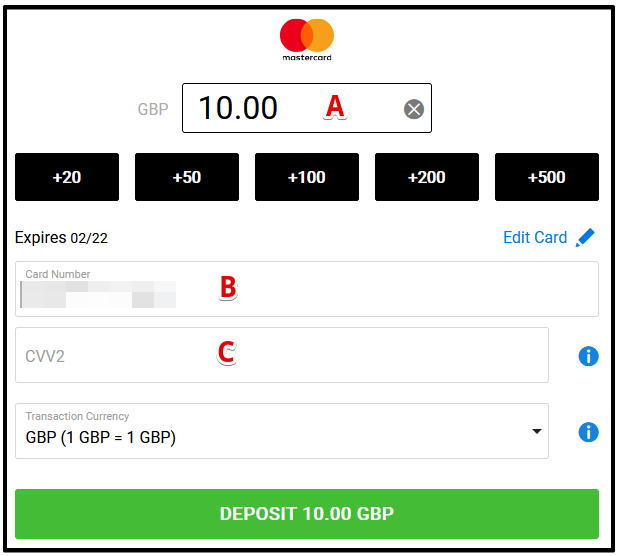
Payment options can vary according to account status and current site policies. Check the cashier page for the methods displayed to you, along with any deposit and withdrawal limits. Make sure the payment method belongs to you and that the name on it matches your account details where required.
UK account checks and responsible gambling
Gambling operators may request identity, age or address documents to meet legal and account-security requirements. If verification is requested, follow the instructions shown in your account and submit documents only through an official, secure channel. Keeping your account information accurate can help avoid delays, though checks may still take time to complete.
Online gambling is for people aged 18 and over in Great Britain. Only gamble with money you can afford to lose, and do not treat casino games or betting as a way to earn income or recover losses. Bwin’s account tools may include limits, time-outs or self-exclusion options; review the responsible-gambling information available on the site. If gambling is causing concern, consider contacting a recognised UK support service such as GamCare.
Frequently asked questions
Can I sign in from a mobile phone?
Use bwin’s official mobile website or an official app where one is available for your device and location. Avoid unofficial app downloads and check the publisher before installing anything.
What if I no longer have access to my registered email?
Contact bwin support through its official website and follow its account-verification process. Do not create a second account to work around the issue unless support tells you to do so.
Why might bwin ask me to verify my identity?
Verification can be required for legal, security or account-management reasons. Submit the requested information only through the official account process and ask support if you are unsure why a document is needed.
Is it safe to stay logged in?
On a personal, password-protected device, staying signed in may be convenient, but signing out after each session reduces exposure if someone else gains access to the device. Always sign out on shared or public devices.
Final checklist
- Use bwin’s official UK website or a trusted official app.
- Protect your account with a unique password and never share verification codes.
- Use the official recovery process if you forget your login details.
- Review promotion and payment terms before entering a voucher or depositing.
- Contact support through verified channels and use responsible-gambling tools when needed.
A secure bwin login depends on more than remembering a password. Confirm the site is genuine, keep your account credentials private, and handle promotions and payments through official channels. If you encounter a problem, pause before trying again and use bwin’s published support and recovery procedures.